Javaweb-js学习
js学习
- 计算机脚本语言
一、核心语法
1.js脚本引入方式
可以在页面任意地方定义,一般建议将js脚本放到页面底部
内部脚本
<script> //1.内部脚本 alert("hello world"); </script>1
2
3
4
5
6
7
* **外部引用**
* ~~~html
<script src="js/demo.js"></script>
外部脚本就不需要写script标签了
2.基础语法
变量声明
关键字 声明变量 let 声明常量 const *var关键字已经过时 let a; a=10 console.log(a); a=true; console.log(a); const b=10 ; console.log(b);1
2
3
* ~~~javascript
特点:JS是弱类型语言,变量可以存放不同类型的值
变量输出方式
1.alert();弹窗 2.console.log();控制台输出 3.document.write();文本输出到html中1
2
3
4
5
6
7
8
9
10
11
12
13
14
15
16
* **js数据类型**
* ~~~JavaScript
1.number
表示数字,所有数字都是这个
2.布尔类型
3.null
typeof null 输出object
对象为空
4.undifined
变量未定义
5.字符串
可以通过typeof获取数据对应类型
console.log(typeof a);反引号字符串便于字符串拼接 例如: let name = 'TOM' let age = 18; console.log(`我是${name},我今年${age}岁`);1
2
3
4
5
6
7
8
9
10
11
12
13
14
15
16
17
18
19
20
21
22
23
24
25
26
27
* **函数**
* **定义方式**
* ~~~javascript
1.具名函数
fuction name(){
//具体方法
}
如:
function chaun(a,b){
return a+b;
}
let result =chaun(10,20);
console.log(result);
2.匿名函数
函数表达式
let add = function(a,b){
return a+b;
}
箭头函数
let add =(a,b) => {
return a+b;
}
3.自定义对象
在使用箭头函数匿名定义类函数时,需注意不要成为this只想当前对象父亲1
2
3
4
5
6
7
8
9
10
11
12
13
14
15
16
17
18
19
20
21
22
23
24
25
26
27
28
### 4.json
* **json是一种字符串,对象是代码操作**
* **互相转化**
* ~~~JavaScript
json -> 对象
JSON.parse()
对象 -> json
JSON.Stringify()
let user = {
name:'TOM',
age:18,
sex:'男',
sing:function(){
console.log(this.name+'会唱歌');
}
}
console.log(JSON.stringify(user));
let string = '{"name":"TOM","age":18,"sex":"男"}'
console.log(JSON.parse(string).age);
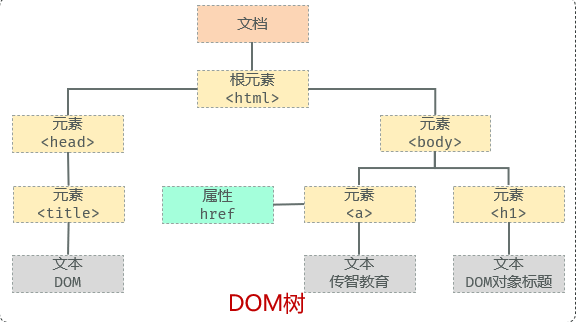
5.DOM操作
将标记语言的各个组成部分全部包装为对象
Document:整个文档对象 Element:元素对象 Attribute:属性对象 Text:文本对象 Comment:注释对象1
2
3
4
5
6
7
8
9
10
11
12
* 
* **操作dom**
* ~~~shell
1.获取DOM元素对象
document.querySelector(''); //根据选择器获得的第一个对象
document.querySelectorAll('');//返回伪装数组
2.利用官方api操作dom对象
document对象<body> <h1>黑马程序</h1> <h1>黑马程序</h1> <h1>heoma</h1> <p>黑马程序是一个专业的IT培训机构,专注于为学生提供专业的IT课程。</p> <script> let h1 = document.querySelector('h1'); console.log(h1); h1.innerHTML = '黑马程序yuan'; let h = document.querySelectorAll('h1'); console.log(h); h[2].innerHTML = "黑马程序aaaaa" </script>1
2
3
4
5
6
7
8
9
10
11
12
## 二、事件监听
* ~~~html
事件:
按钮被点击
鼠标移动到元素
按下键盘按键
1.创建格式
1
2
31.事件源.addEventListenner('事件类型',事件触发函数);
2.事件源.on“事件类型” = 函数
缺点:第二种方式,赋值第二次时会覆盖前面的1
2
3
4
5
6
7
8
9
10
11
12举例:
<input type="button" id="btn1" value="点击我1">
<input type="button" id="btn2" value="点击我2">
// 1.最新方式
document.querySelector('#btn1').addEventListener('click',function(){
console.log('点击了按钮1');
})
// 2.早期写法
document.querySelector('#btn2').onclick = function(){
console.log('点击了按钮2');
}
2.常见事件
3.模块化优化
通过import关键字可以从js文件中导入js文件
import {printlog} from './js/demo1.js'1
2
3
4
5
6
* **将函数暴露**
* ~~~javascript
export function printLog(){
}
html文件应用时需要设置类型
<script src='./js/demo.js' type="modul"></script>
本博客所有文章除特别声明外,均采用 CC BY-NC-SA 4.0 许可协议。转载请注明来源 十七.!
相关推荐
2025-05-22
Javaweb-HTML学习
javaweb中前端初学部分,这一块是web基础部分,也是网页的基础部分
2025-06-03
Javaweb-Ajax学习
javaweb中ajax学习,这个是前端向后端发起请求的包装吧
2025-05-28
Javaweb-Vue框架
javaweb中vue框架部分,这个算是一个主流的做前端网站的框架吧
2025-06-01
Javaweb-Vue工程
javaweb中vue框架深入研究,具体到网站路由等
2025-11-10
苍穹外卖-DAY01
苍穹外卖课程的第一天,项目总体认识、接口文档创建、git环境搭建,登入功能完善
2025-11-11
苍穹外卖-DAY02
苍穹外卖课程的二天,员工模块完善,新增员工,查询员工等接口开发